![hindiste-logo.png]](https://portal.fieldcentral.com/hs-fs/hubfs/HindSite/hindiste-logo.png?height=40&name=hindiste-logo.png)
This article walks through:
- When surcharge applies
- What you and your customers will see
- How FieldCentral keeps everything accurate and compliant
- How to confidently use surcharge in your daily workflows
What Is a Credit Card Surcharge?
A surcharge is a small percentage added to credit card payments only to help cover processing fees.
Important things to know up front:
- Debit cards are never surcharged
- Some states cap or restrict surcharge amounts
- Not every card qualifies
FieldCentral automatically checks all of this for you every time a card is used.
You never have to guess.
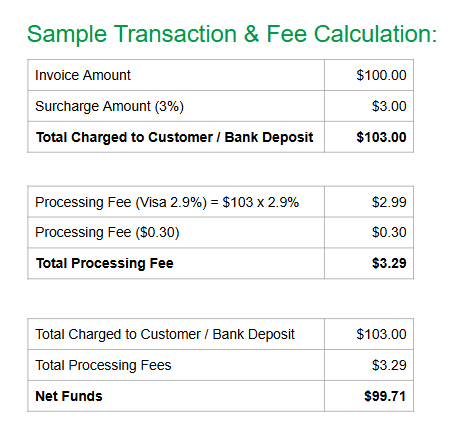
A sample breakdown of surcharge:
The Real-World Scenario
Let’s say you’re:
- Taking payment for a visit
- Collecting prepayment on an estimate
- Charging a customer through the mobile app
A customer enters their card information.
At that moment, FieldCentral:
- Checks whether the card allows surcharge
- Verifies state and card-brand rules
- Calculates the maximum allowed surcharge
- Shows the customer exactly what will be charged
Nothing is hidden. Nothing is assumed.
What You’ll See During Payment
Step 1: Entering Card Information
When a new card is entered:
- Card number, expiration, and CVV are entered securely
- Billing ZIP / Postal Code is required (this ensures compliance)
At this point, no surcharge has been applied yet.
Step 2: Surcharge Check Happens Automatically
Once the card details are submitted, FieldCentral checks:
- Is this a credit card?
- Is surcharge allowed for this card?
- Does the customer’s location allow surcharge?
- Is there a state cap (for example, Colorado caps surcharge at 2%)?
You don’t need to know these rules — FieldCentral handles them for you.
Step 3: If a Surcharge Applies
If a surcharge is allowed:
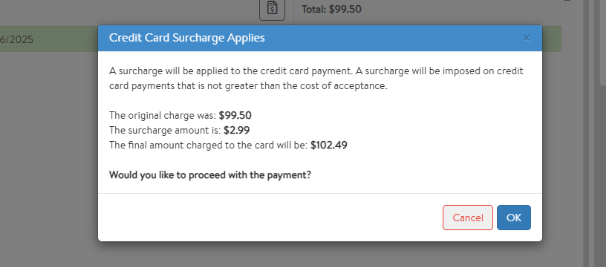
- A clear message appears explaining:
- Original payment amount
- Surcharge amount
- Final total to be charged
The customer (or admin) can:
- Proceed with payment
- Cancel and choose another payment method
Nothing is charged until the user explicitly agrees.
Step 4: Payment Is Processed
Once approved:
- The final amount (original + surcharge) is charged
- The payment is processed securely
- Records flow into FieldCentral and accounting normally
If no surcharge applies, the payment proceeds as usual with no extra steps.
Where Surcharge Works in FieldCentral
Surcharge logic is applied anywhere a payment is processed, including:
- Admin
- Paying an invoice from the Schedule screen
- Accepting & paying for a prepaid estimate
- Customer Acceptance Page
- Customers paying for prepaid estimates
- Mobile App
- Technicians collecting payment in the field
The experience is consistent everywhere.
Saved Cards vs New Cards
New Card
- Surcharge is evaluated after card entry
- Customer sees surcharge message before payment completes
Saved Card
- Surcharge is evaluated before payment is finalized
- The same rules and transparency apply
Either way:
- Debit cards are excluded
- State rules are enforced
- The customer is always informed
What You Don’t Have to Worry About
You do not need to:
- Calculate surcharge percentages
- Track state-by-state rules
- Know which card brands allow surcharge
- Adjust payment totals manually
FieldCentral and Forward handle all of this automatically and compliantly.
Surcharge can feel sensitive — but FieldCentral ensures it’s:
- Transparent (no surprise fees)
- Optional (customers can cancel)
- Compliant (card + state rules enforced)
- Consistent (same experience everywhere)
Your team stays confident.
Your customers stay informed.
Your payments stay accurate.
You’re Ready If You Can:
 Take payment with a new card
 Understand that surcharge may or may not apply Recognize that customers always see the final amount before paying Trust FieldCentral to enforce compliance automatically
If you can do those things, you’re fully equipped to use surcharge confidently.