![hindiste-logo.png]](https://portal.fieldcentral.com/hs-fs/hubfs/HindSite/hindiste-logo.png?height=40&name=hindiste-logo.png)
New Features: Available Now
The following are FieldCentral features that you can use today!
Management Company Improvements (BETA)
Your larger customers - home owner associations, commercial properties, etc. - often require different communications & invoice grouping than your residential customers. We’ve added two new features to help support some of these needs.
-
- Management Company Groups - Configure which Management Company Contacts should receive email & text communications for a given Management Company Property.
- Group All Properties onto a Single Invoice - At billing, create a single Invoice for all Properties under a Management Company.
These features are in BETA - so contact a Product Specialist to enable the features, and provide you with training.
FieldTracker (GPS): Map Improvements
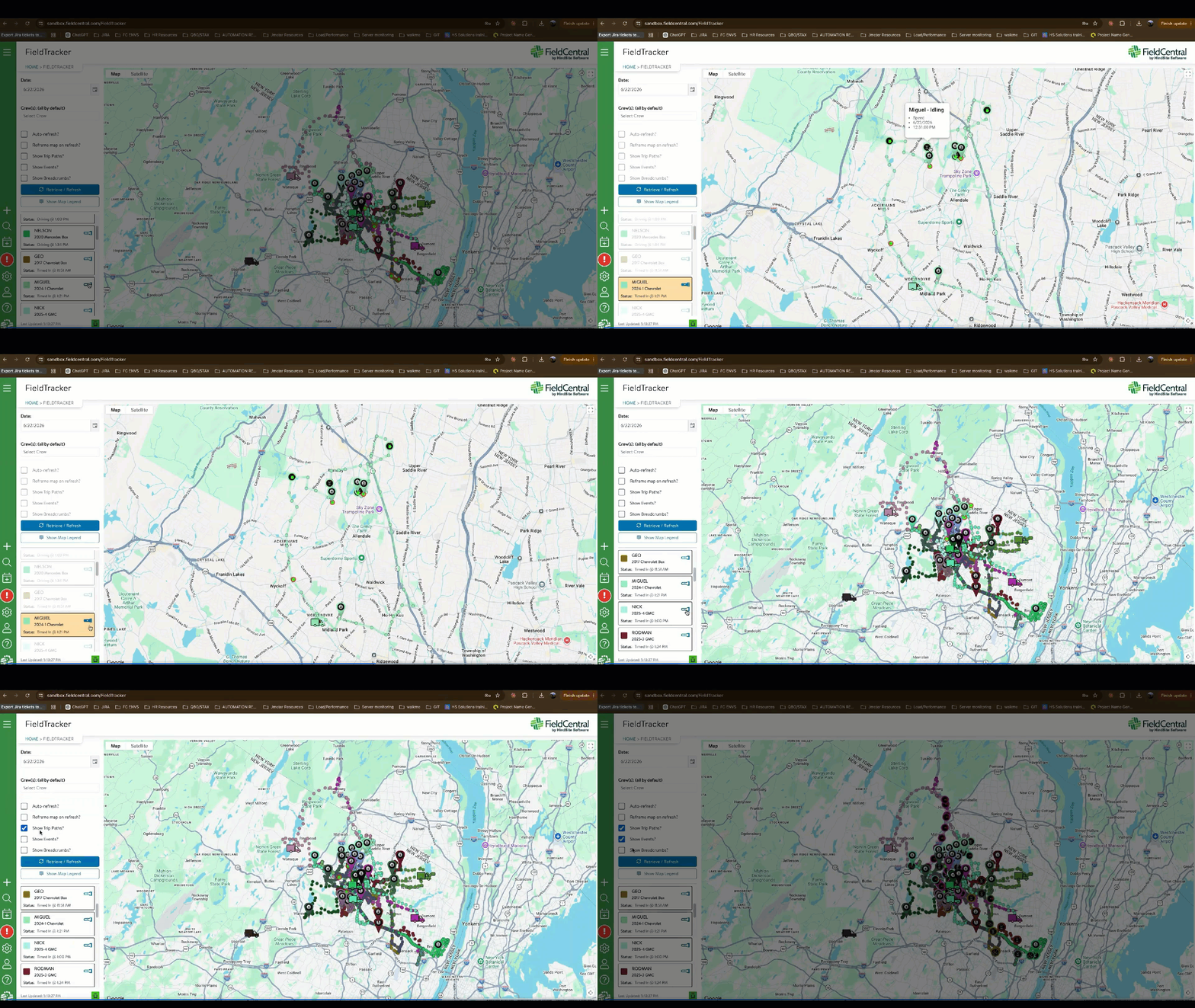
The overall performance and stability of the page has been improved, quickly rendering your crews’ vehicles onto the local map (and not into the ocean). The ‘Show Events’ and ‘Show Breadcrumbs’ will be off by default, and users can click on individual crews/vehicles to quickly focus the map on their activities.
Timesheet Report: Summarization & Admin Time Options
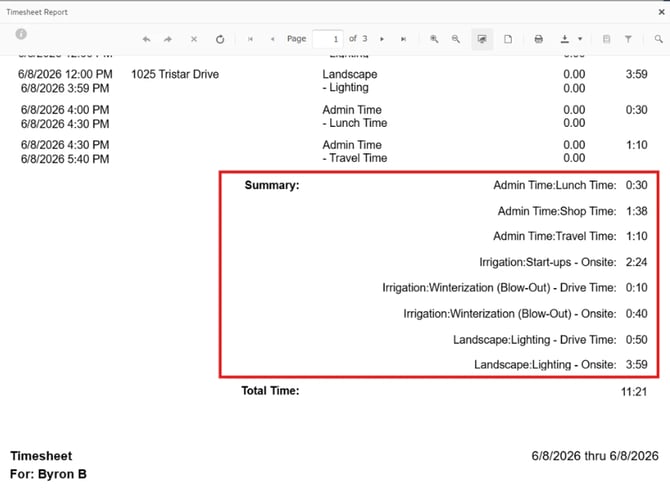
Want to see a summary of crew members’ time by Service Category, Service, or Admin Time Types (e.g. Shop Time, Lunch, Travel)? We’ve added an option to the report to summarize these times for department or group reporting, and give more details on Admin Time.
QB Integration: Property Billing Name Field
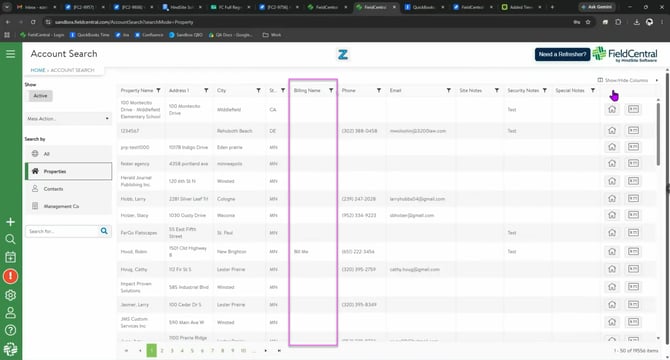
A new Property ‘Billing Name’ field has been added in FieldCentral (FC). When populated, this will pass into QuickBooks:
-
- QuickBooks Online (QBO): The FC ‘Billing Name’ value will populate the ‘Company Name’ field on the QBO Account record. This ‘Company Name’ field is currently used by QBO to populate both the Billing and Service Address blocks when a QBO Invoice is created.
- QuickBooks Desktop (QBD): The FC ‘Billing Name’ value will pass directly onto the Billing Address block on the QBD Invoice.
Features Coming Soon
Expect to see these features launching in the next few months!
Estimate > Contract > Visit: Materials & Flat Rate Items
Improving the FieldCentral estimation process and workflow continues to be a primary focus for us. Our next enhancement will greatly improve the flow of Materials from Estimates to Contracts to Visits - making the process more automated and efficient.
First, we are making usability improvements to how Materials & Flat Rate Items are added to the Estimate and ensuring that prices are accurately reflected on the Estimate.
Upon Estimate acceptance, Materials and Flat Rate Items under a Service will automatically flow onto the Contract. Users can see those Materials on the Contract, including the quantity and prices that were on the Estimate.
As Visits are scheduled against the Contracted Services, the attached Materials will automatically flow onto that Visit. Mobile app users will see the Materials list and the recommended quantities. They can quickly confirm the materials used, replace them with a different material, or add new materials to the visit.
FieldCentral Payments: Mass Sending Payment Links & More
Getting you paid faster is another major focus for us. Our existing Estimate Prepayment feature has helped you collect cash at the beginning of the season. Now, we want to make it easier to collect payments after invoicing - and add a number of payment enhancements that you’ve been asking for.
Improve QuickBooks Invoice Refresh
We are rolling out major backend enhancements to ensure FieldCentral is aware of any updates you make to your QuickBooks (QB) Invoices.
-
-
- For QuickBooks Online (QBO), we will leverage their webhooks technology to be automatically notified when a QBO Invoice is updated. Within ~10 minutes, Invoice changes made in QBO will automatically flow into FieldCentral.
- For QuickBooks Desktop (QBD), we are improving the import utility to more efficiently capture QBD Invoice changes and update FieldCentral.
-
QB Invoice changes include: line item price, line item quantities, marked as paid by check, etc. There will also be an option to only refresh QB Invoices that originated in FieldCentral or pull all QB Invoices.
Auto-Updating Existing Payment Links
When a QB Invoice change is detected, FieldCentral will automatically update the payment link data as well. The amounts and invoice details will be updated to match what is in QB. We will also deactivate the payment link if the QB Invoice is marked as paid.
Invoices Page: Mass Send Payment Links & More
We are adding a new Invoices page in FieldCentral, where you can see which QB Invoices are still open and mass send payment links to your customers to collect payments. Features on this page include:
-
-
- Filters to identify which QB Invoices are open, which invoices were already sent to customers by FieldCentral, and more.
- See QB Invoice details - line items, subtotals, due date, and more
- Mass send payment link emails/texts for a bunch of invoices, or work through each invoice on the list.
- Look at the history of payment links - when were they sent and to whom.
- Manually deactivate / delete a payment link.
-
Quality of Life Improvements
We are also making a number of usability improvements, targeted to make your day-to-day work more efficient. A few notable items include:
-
- Schedule Screen Auto Refresh: If you have more than one person making adjustments to the schedule, those changes will automatically appear on the other users’ screens. Users will no longer need to refresh the page or browser.
- Billing Page Improvements: The billing page filters and selected visits will be retained as users make updates in the visit summary modal.
- Incompletes Page Improvements: The filter options added to the page will remain as users action the incompletes page.
These are just a few of the recent & upcoming features we’re adding to FieldCentral. Keep an eye out for future emails and pop up notifications in FieldCentral announcing their release.