
2.4.0.2,2.4.0.1,2.4.0.3,2.4000.00,2.4.0.4,2.4.0.5,2.4.2.0,2.4.2.1,2.4400.00,2.4.4.0,2.5.0.0,2.5.2.0,2.5.4.0,2.5.6.0,2.5.6.1,2.5.8.0,2.5600.00,2.5.10.0,2.5600.01,2.5.12.0,2.5.12.1,2.5.14.0
We are excited to share with you the updates included in this release for FieldCentral. The announcement will be broken up into three sections: New Things, Updated Features, and Resolved Issues.
We greatly appreciate any time you invested in order to either report an issue or request an enhancement. Your feedback is highly valued!
NEW THINGS:
The following are new features that provide you with additional capabilities and functionality.
- Surcharging is now publicly available for any FieldCentral Payment clients. If allowed in your location, pass along the majority of card processing fees to your customers. Enabling this feature requires an appointment with a Product Specialist.
- Estimate Prepayment is now publicly available for FieldCentral Payment clients. When sending out your annual service agreements, capture card payments at the time your customers select & confirm their agreement. Enabling this feature requires an appointment with a Product Specialist.
UPDATED FEATURES:
The following are updates to existing features that are intended to enhance the quality of life for our clients.
-
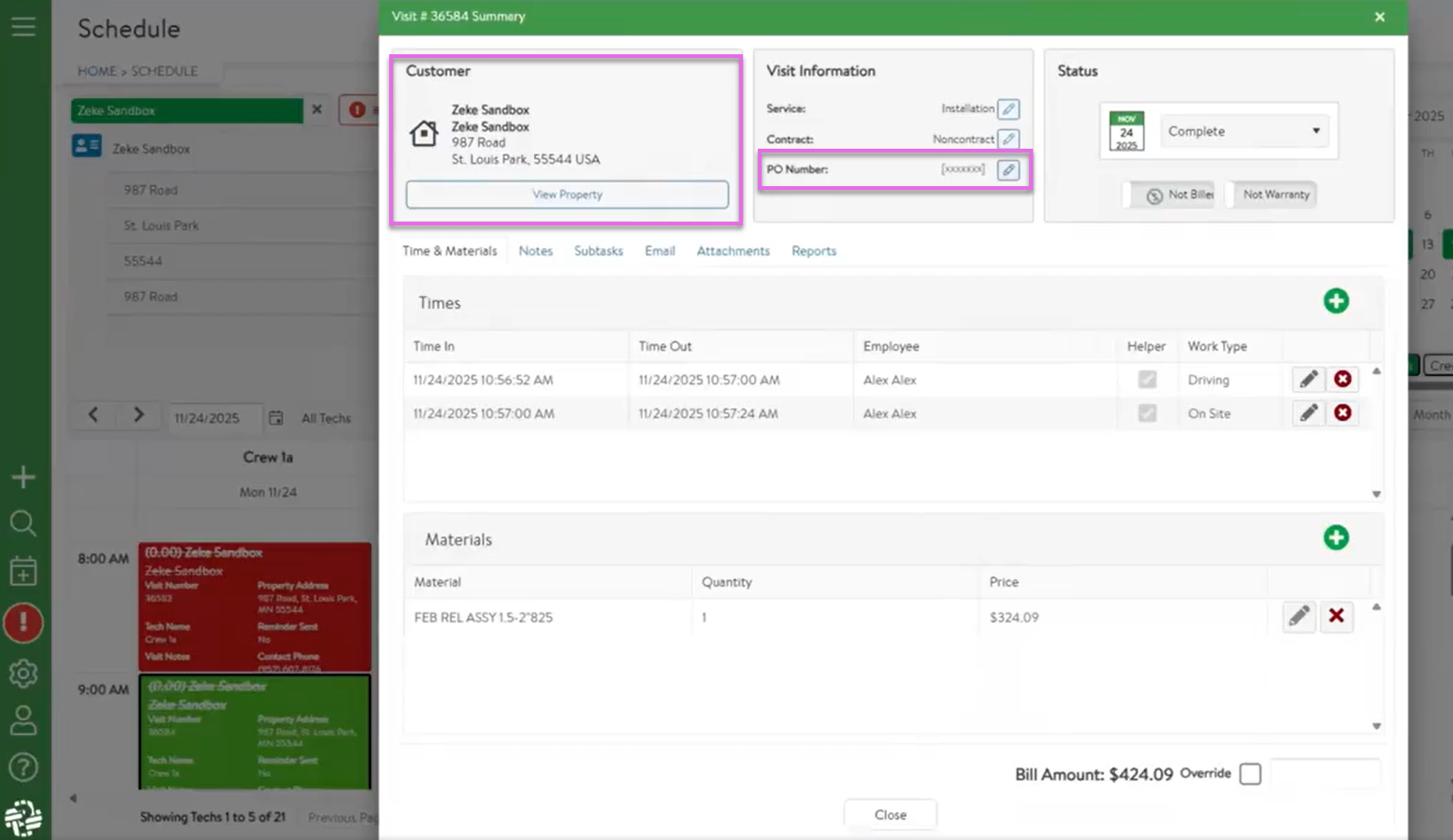
- The Visit Summary has been reorganized to have a clearer display, and several new functions have been added.
- The relevant Property information will be more clearly denoted, with an added button to access that property in a new tab.
- The PO Number has been added as an editable field.
- If the visit has been sent to QuickBooks, the QuickBooks Invoice number will be displayed.
- Added a new Communications variable that will display a two-hour window, rounded to the full hour, as opposed to the half hour.
- When Crews have permission to see completed visits, attachments will now also be available on those visits.
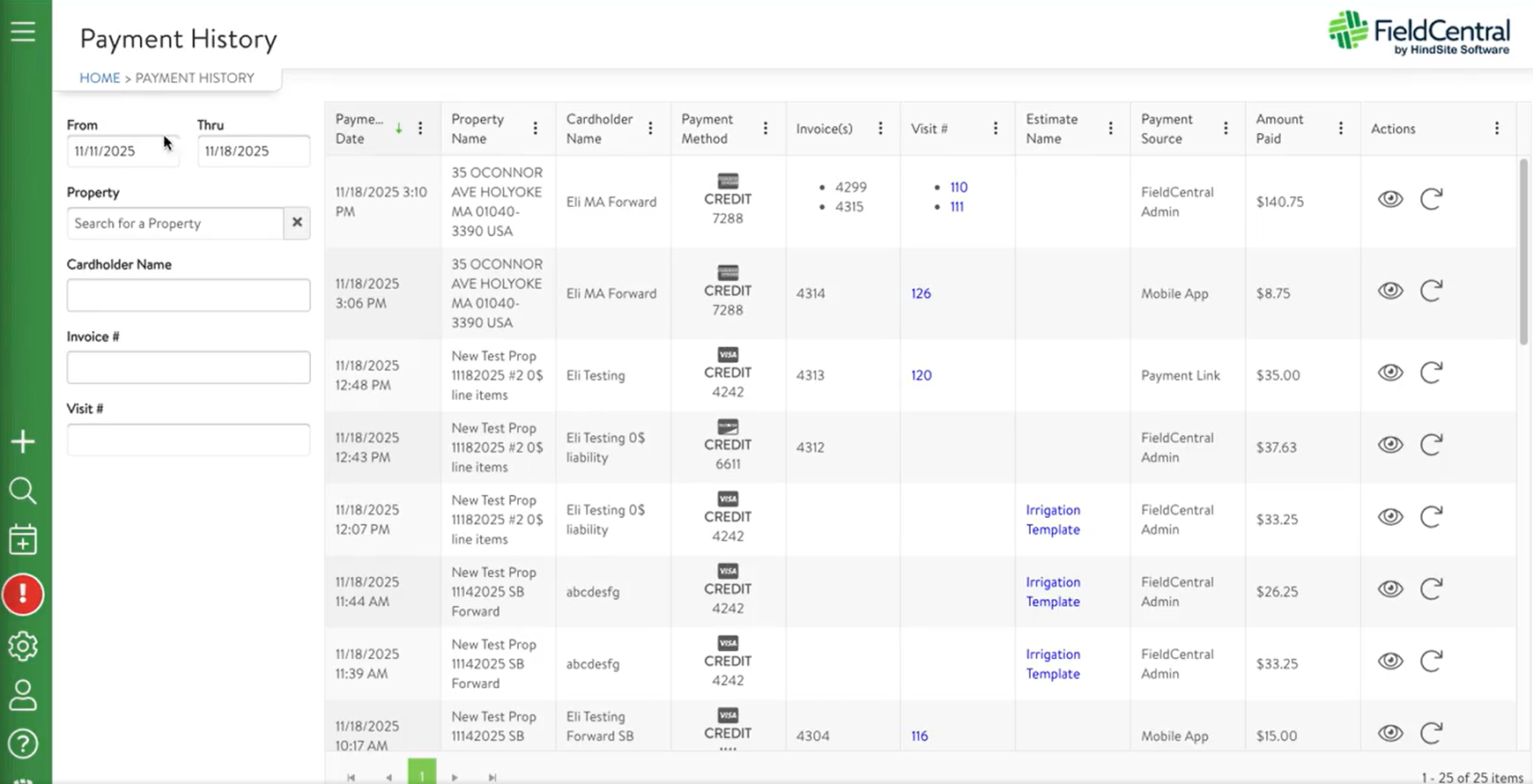
- New navigation item & page for FieldCentral Payment clients. See historical payments processed through FieldCentral along with what was paid for (e.g. invoices, prepaid estimates, completed visits via mobile, etc.). Also have the ability to resubmit payment to QBO/QBD if needed, and see what payments are queued to be sent to QBD.
- Previously, estimates carried an 'Estimate Note' field, which went to both the Estimate PDF and to the field as a 'Scope of Work'. We have split this functionality into 'Customer Notes' and 'Visit Notes' - allowing different information to be displayed between the Customer's PDF and the Crew's Visit.
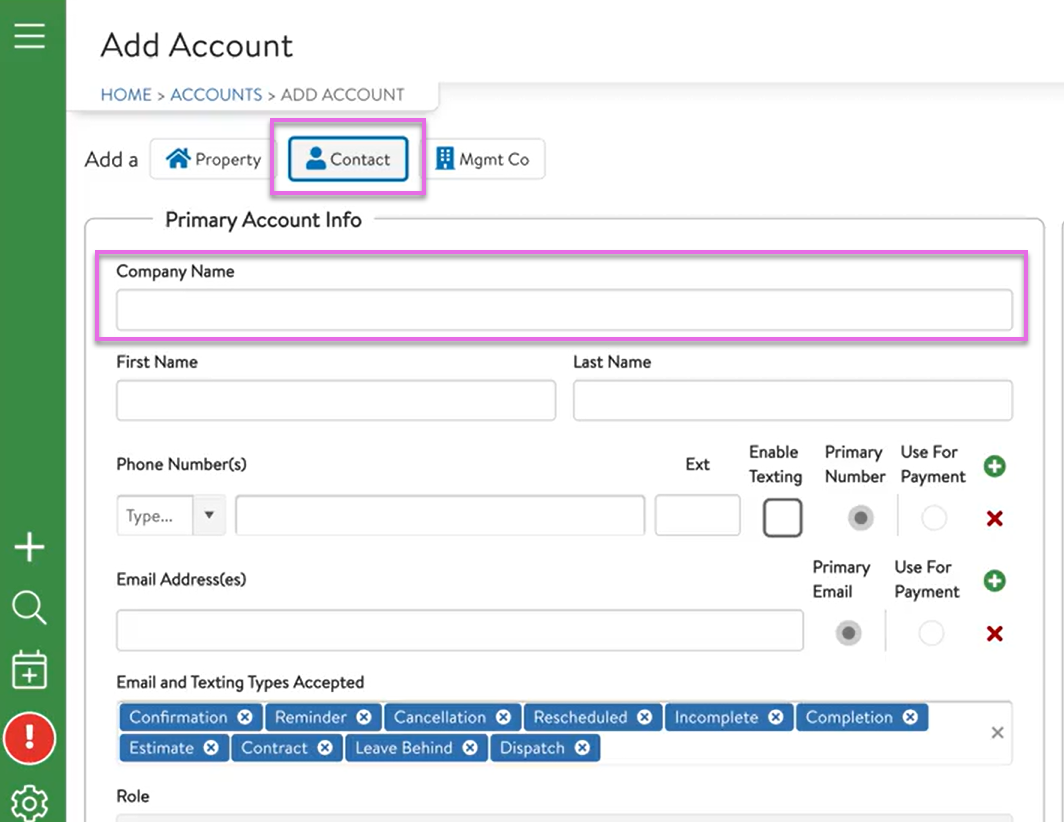
- The "Company Name" field has been added to the Contact creation process. When creating a Contact, a user may enter a Company Name instead of a First and Last Name.
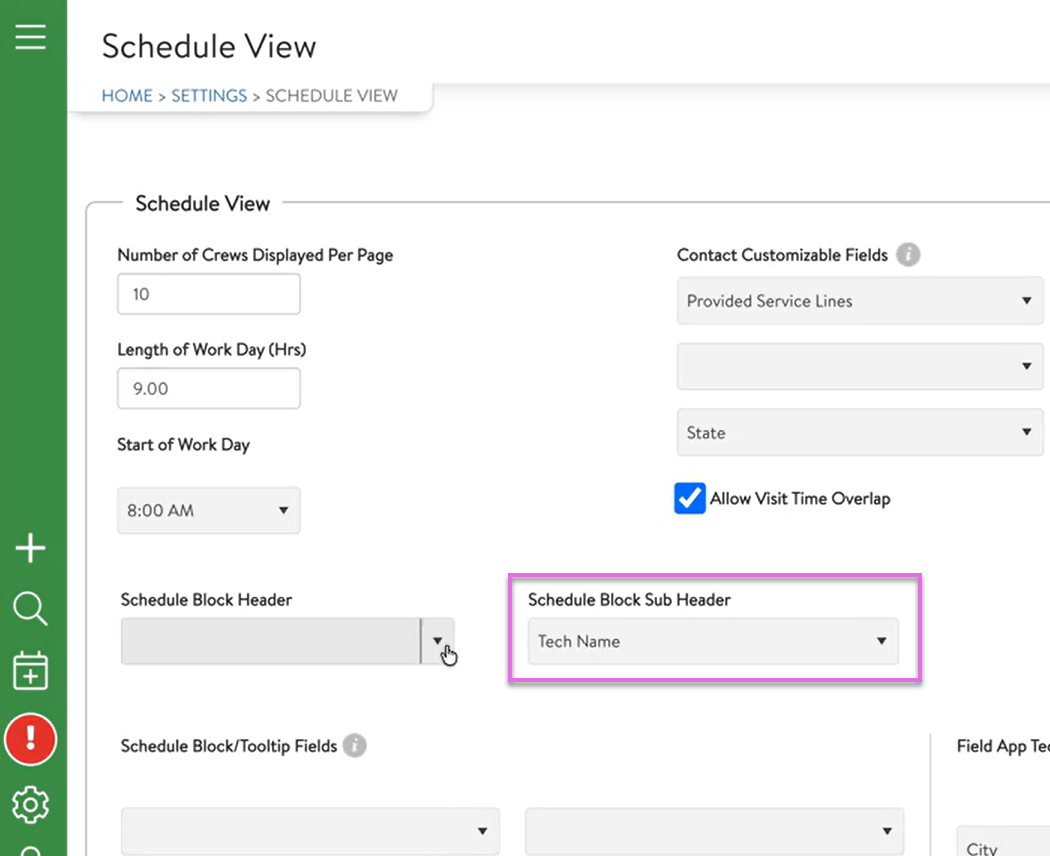
- When configuring the Schedule View, users can now designate a field for the sub-header option. Previously, it was hardcoded to be the Property Name.
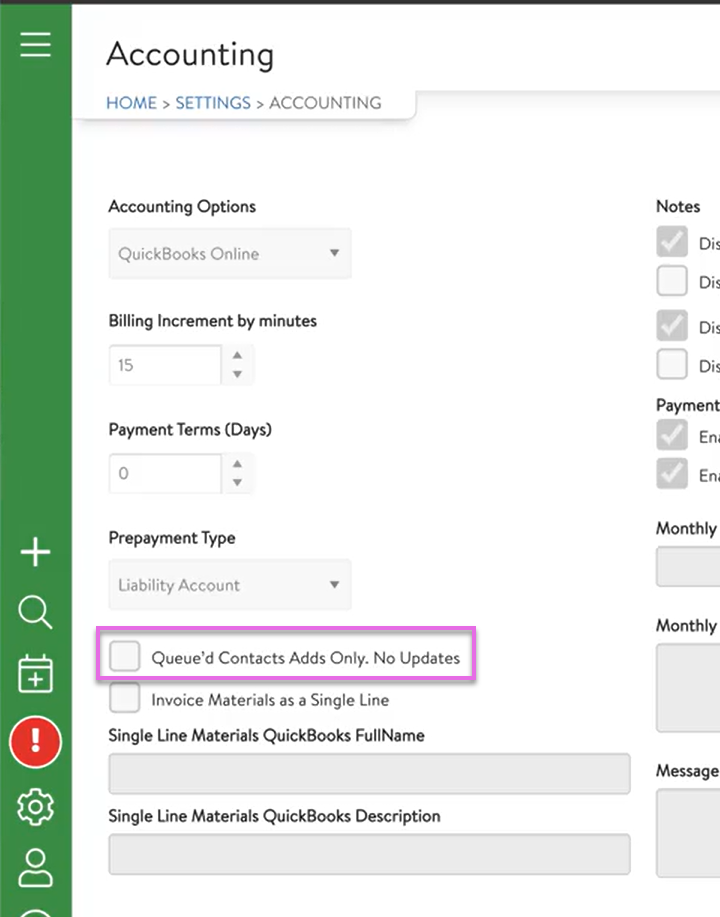
- A new QuickBooks Online option has been added to Settings > Accounting: "Queue'd Contact Adds Only. No Updates". This setting will create new Customers within QuickBooks when applicable, but will not update data on existing QuickBooks Customers.
- When an extended visit is marked complete, automatic and manual sends will now honor all parts of the extension to trigger a completion notice.
- When Mass Scheduling Visits To Do, the 'Starting At' time will be honored, and visits placed on the schedule will be inserted around pre-scheduled visits.
- The Visit Summary has been reorganized to have a clearer display, and several new functions have been added.

- (MOBILE) Updated mobile app to replace 'Work to Do' / 'WTD' labels with 'Service' and 'Service Categories'.

RESOLVED ISSUES:
The following are client-reported issues and HindSite Software discovered issues that have now been resolved.
- The annual Revenue chart and Gross Profit report are correctly showing revenue when a visit was contracted, invoiced, and has a bill type of flat rate. It was previously calculated as time & materials.
- Fixed Visit Summary & Gross Profit reports showing inaccurate labor amounts, and therefore inaccurate totals.
- Gross Profit & Annual Revenue Reports no longer duplicate overridden billing amounts when there are multiple Visit Parts.
- Color Rule ‘Contract’ now applies color to the inner pin of a visit on the mass schedule map when applied.
- Improve performance when searching for materials to add to a visit within the visit summary modal.
- The Property Service notes now go to the Visit even when mass added to VTD from the Accounts page.
- On the Visits to Do page, when adding a new column & filtering, the page will no longer reset when attempting to Mass Schedule the visits in the grid.
- User can successfully drag/drop a pending visit from the Property Summary modal onto the Schedule. Previously, users would see an error that said 'Please select a time for this visit,' and the appointment would not be saved.
- Non-billable services will now display on the Billing page to be included in the QB invoice.
- Users can now view & edit the VTD detail when accessing the VTD from the Schedule > Property Search > Property Summary modal. They no longer see the 'Invalid Contract ID' error.
- Removed the option to select an inactive Service when creating an Estimate Template - which would result in errors when trying to create an Estimate from that Estimate Template.
- Inactive Services will no longer show as an option to add to an Estimate.
- On the Billing page, the Service filter is now filtering records as expected.
- Resolved an issue where Price Matrix was not correctly applying to certain Estimates.
- On the Visits page, historical Visit records will show on the list, even if the attached Service was deleted from the system.
- On the Schedule screen & selecting a Visit, performance is improved when clicking the "Email" button. The customer information and email template will load quickly.
- When adjusting a Visit To Do tied to a Price Matrix, the Rate Type will no longer flip to unassigned.
- Fixed an issue where Contacts that were unsubscribed from Communications were not displaying the unsubscribe status.
- Entering Property Level Pricing without a rate type will no longer cause calculations to error.
- Fixed the issue where payments would not process for contacts with a single quote in their name.
- Only active users will be used as the 'sender' of emails.
- Marking a user as 'Inactive' will no longer throw errors, and they will remain in the list to reactivate later.
- Users can now edit the sequence/order of the elements on the Request Form page
- Updated the "Shift/Rain Day" action to ignore the current date when identifying the "Next Empty Day".
- (MOBILE) Corrected an issue where historical attachments were sometimes not displayed on the field application.
- (MOBILE) Updated processing for Attachments on the field application to avoid improper retrieval and display.
- (MOBILE) When adding an attachment to the field application, that attachment will now display once attached, prior to websyncing - as opposed to only after syncing.
We encourage YOU to communicate with us as you discover features that would help you in your day to day business and let us know if you run into a system issue so we can quickly address it. We are here to help and make your life easier!
Please take advantage of the Help Desk when logged into FieldCentral if you do have an issue or you want to submit a new feature idea.