![hindiste-logo.png]](https://portal.fieldcentral.com/hs-fs/hubfs/HindSite/hindiste-logo.png?height=40&name=hindiste-logo.png)
When working with management companies, there is a whole team of people you may work with as you continue to provide service to property the company manages. Considering this, it is crucial to ensure you have the correct contact information recorded to know exactly who you need to talk to when questions about a specific property arise. To assist with this issue, FieldCentral offers a management groups feature specifically intended to match the proper stakeholders from the management company to their individual properties.
To start utilizing management groups in your FieldCentral account:
- Contact Us at HindSite
Currently the feature is gated by our team to still allow for a simple approach to contacts relationships inside of FieldCentral. Rest assured, if you need more complex tracking of your management company contacts in FieldCentral, a representative can enable that functionality in seconds.
- Navigate to Management Company Record
In the accounts section of FieldCentral, you can choose the option on the left to display management companies. Once selected, additional filters can be added to find a specific management company. Once displayed, you would double click the record to open the management company account.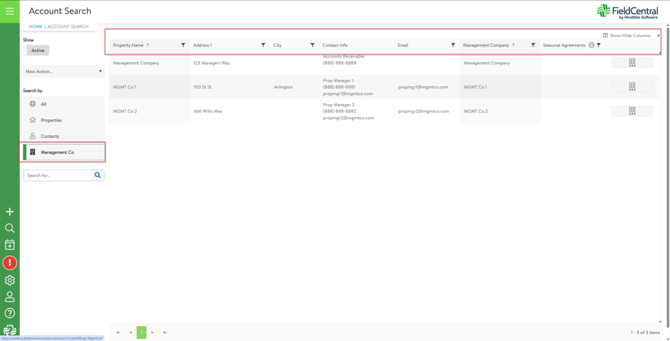
- Setup Management Company Groups
Once in the management company account, you would first click the edit icon in the top right corner. After entering edit mode, you can navigate to the “Mgmt Groups” tab on the account. Next, you click the green plus symbol on the right side of the page and give the group a name before choosing the contact(s) from the management company that should be associated with the group. This process would be repeated for each group needed for the management company.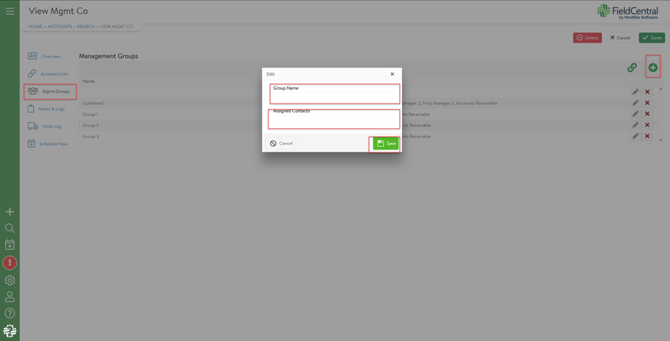
- Assign Mgmt Groups to Managed Properties
With the Mgmt Groups created, you can now assign those groups to properties managed by the management company. To do this, you can click the green link icon in the Mgmt Groups section of the account. This should open a module with a list of the properties associated with the management company and the newly created groups. In this section, you can click and drag properties to their designated groups to be assigned before clicking Save & Close. Additionally, management groups can be set individually on the property record if new properties are added to the management company.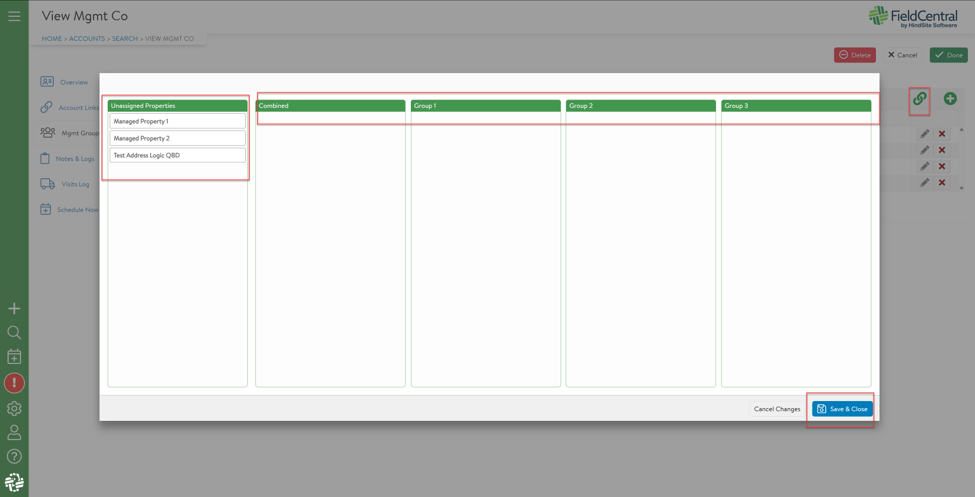
Once management groups are set up and assigned to properties, only contacts relevant to the specific property will be displayed in the properties account links. If you would like to enable management groups or talk to a product specialist regarding how this could be utilized in your FieldCentral account, please call us at 888-752-5978 or send us an email at Support@HindSiteSoftware.com